> For the complete documentation index, see [llms.txt](https://messagebird.gitbook.io/toky-en/llms.txt). Markdown versions of documentation pages are available by appending `.md` to page URLs; this page is available as [Markdown](https://messagebird.gitbook.io/toky-en/integrationstokyapp/change-data-connector-parameters-in-google-data-studio.md).

# Change data connector parameters in Google Data Studio

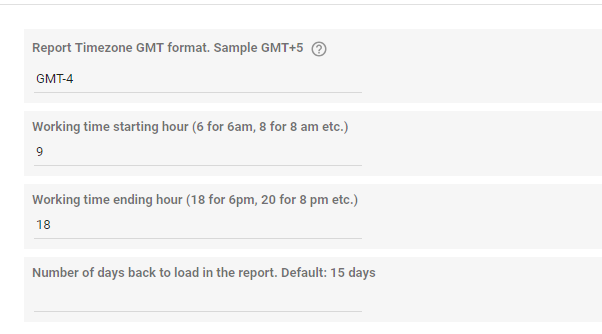
Toky Data Studio connector has some parameters you can change after creating a report or copy an existing one for another analysis:

* Report Timezone GMT
* Working time starting hour
* Working time ending hour
* Number of days back to load in the report

To change these parameters on an existing report you must follow these steps:

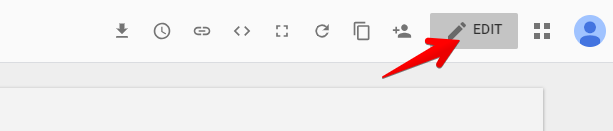
**1.** Click on the **Edit** button

<figure><img src="https://766977813-files.gitbook.io/~/files/v0/b/gitbook-x-prod.appspot.com/o/spaces%2FMgClsjsTSlUrSU2WhwDe%2Fuploads%2Fgit-blob-68fd70dcdb510abf6b89d5b1f8262d3bf554ba9a%2Ftdi_gs_11.png?alt=media" alt=""><figcaption></figcaption></figure>

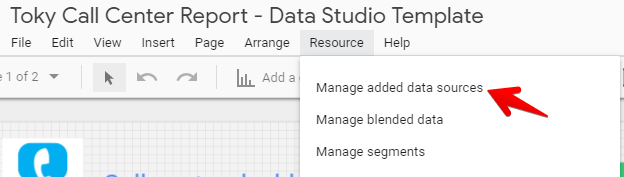
**2.** Click on the **Manage data sources** option in the **Resource** menu

<figure><img src="https://766977813-files.gitbook.io/~/files/v0/b/gitbook-x-prod.appspot.com/o/spaces%2FMgClsjsTSlUrSU2WhwDe%2Fuploads%2Fgit-blob-95d985a6088bd7e60a60668af444d6889d0f8221%2Fimage__1_.png?alt=media" alt=""><figcaption></figcaption></figure>

**3.** Find the **Toky Calls Data source** and click on **Edit**

<figure><img src="https://766977813-files.gitbook.io/~/files/v0/b/gitbook-x-prod.appspot.com/o/spaces%2FMgClsjsTSlUrSU2WhwDe%2Fuploads%2Fgit-blob-84f33345e976a827eeac280d79e45c2e5d2cd0c1%2Fimage__2_.png?alt=media" alt=""><figcaption></figcaption></figure>

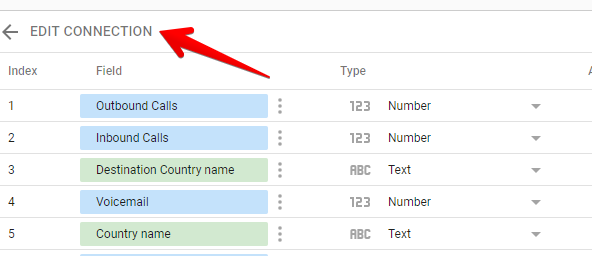
**4.** The connectors field list is loaded, you must click on the **Edit connection** option

<figure><img src="https://766977813-files.gitbook.io/~/files/v0/b/gitbook-x-prod.appspot.com/o/spaces%2FMgClsjsTSlUrSU2WhwDe%2Fuploads%2Fgit-blob-69a011b6008ef982810efefc1471c67cc4df5cbb%2Fimage__3_.png?alt=media" alt=""><figcaption></figcaption></figure>

**5.** The connector's parameters are displayed with current values. Change the parameters you want.

<figure><img src="https://766977813-files.gitbook.io/~/files/v0/b/gitbook-x-prod.appspot.com/o/spaces%2FMgClsjsTSlUrSU2WhwDe%2Fuploads%2Fgit-blob-19a5d1ec15392779f53b25120cbc4a7fce526c20%2Fimage__4_.png?alt=media" alt=""><figcaption></figcaption></figure>

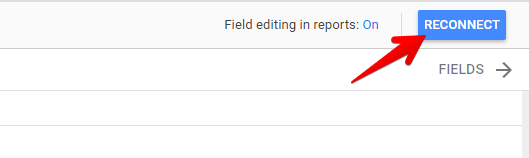
**6.** Click on **Reconnect**

<figure><img src="https://766977813-files.gitbook.io/~/files/v0/b/gitbook-x-prod.appspot.com/o/spaces%2FMgClsjsTSlUrSU2WhwDe%2Fuploads%2Fgit-blob-1a3725725aaae1f6e5eb436f721a60c4e64d0d7a%2Fimage__5_.png?alt=media" alt=""><figcaption></figcaption></figure>

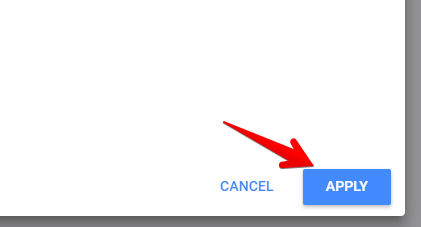
**7.** The process will validate if the connector has new fields. Click on **Apply**\\

<figure><img src="https://766977813-files.gitbook.io/~/files/v0/b/gitbook-x-prod.appspot.com/o/spaces%2FMgClsjsTSlUrSU2WhwDe%2Fuploads%2Fgit-blob-8b595811a50de728eb641242e0e5b707d564bcc4%2Fimage__6_.png?alt=media" alt=""><figcaption></figcaption></figure>

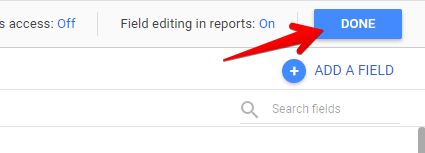
**8.** Click on **Done**\\

<figure><img src="https://766977813-files.gitbook.io/~/files/v0/b/gitbook-x-prod.appspot.com/o/spaces%2FMgClsjsTSlUrSU2WhwDe%2Fuploads%2Fgit-blob-8e4928d9f19711b1bd691ae17da12c0f9ec3bc24%2Fimage__7_.png?alt=media" alt=""><figcaption></figcaption></figure>

Now the report will load data with the new parameters.

If you want to know more about Toky Data Studio connector you can [read this article](https://tokyapp.zendesk.com/hc/en-us/articles/360020676877)